Cloud API
The Cloud API is the server-side interface to Unlayer. It runs outside the browser and lets your backend:
- Generate artifacts (HTML, PDF, Image, ZIP) from a design JSON
- Manage templates stored in your Unlayer project
- Convert designs between Full and Simple schema forms
- Validate a design against the Unlayer schema
- Execute secure operations that should not run in the browser
When to use the Cloud API
Reach for the Cloud API when:
- You need to generate a PDF from a design in a background job
- You want to export HTML without exposing API keys to the browser
- You want to generate an image preview server-side
- You are running a cron job, webhook handler, or worker process
- You need to validate or convert a design payload before storing or rendering it
If your use case involves embedding a visual builder or editor in your frontend, see Builders instead.
How it works
Most server workflows follow this pattern:
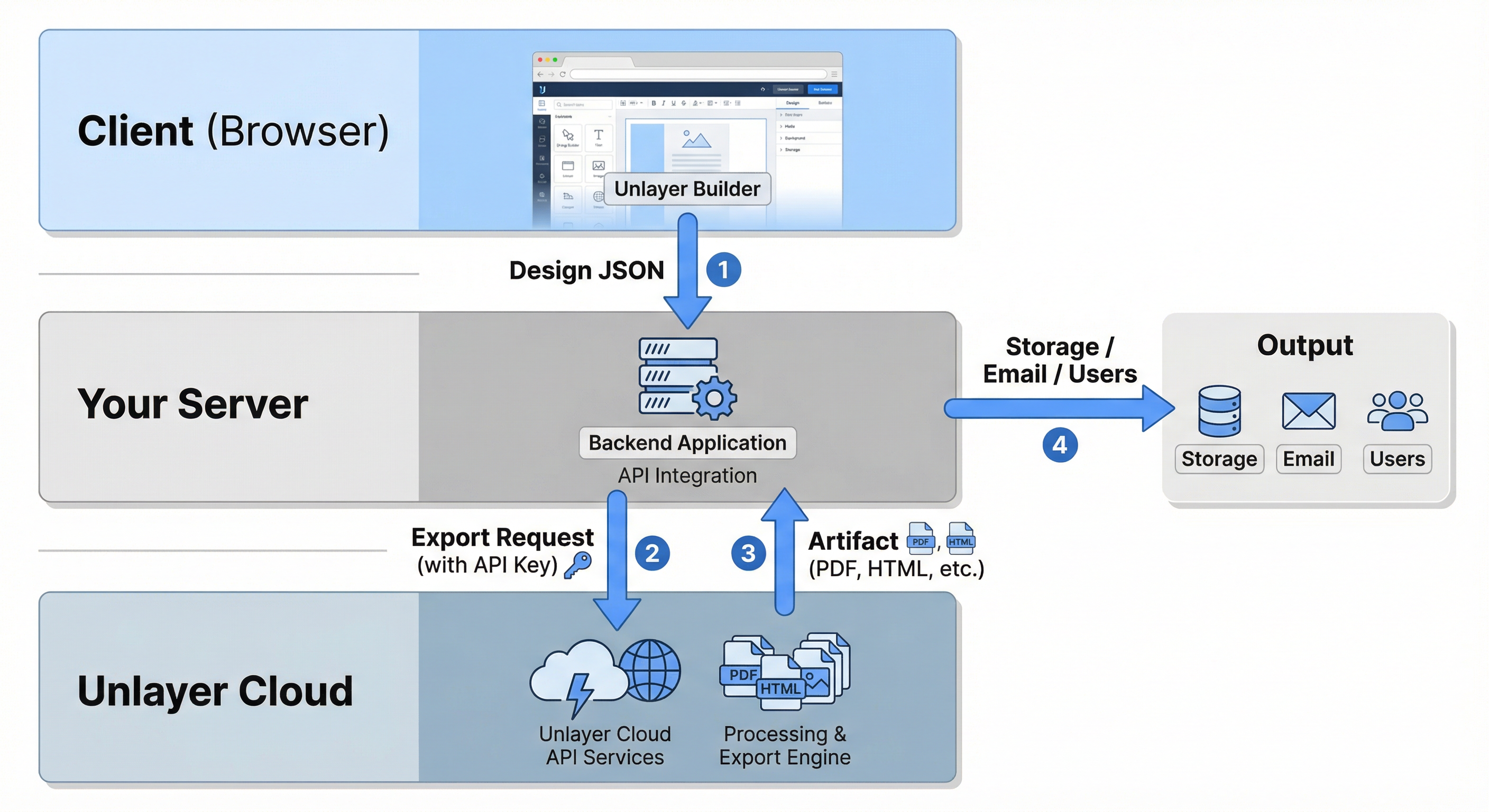
- A Builder produces a design JSON (in the browser).
- Your backend sends that JSON to the Cloud API.
- The API returns a generated artifact (HTML, PDF, Image, ZIP) — or a validated / converted design payload.
- You store, send, or distribute the result.
For HTML export, you often don't need the Cloud API — the builder can produce HTML directly in the browser via unlayer.exportHtml(). Use the Cloud API when you need to export HTML server-side (for example, in a background job or when the user is not in the builder).
Security model
The Cloud API uses bearer-token authentication — API Key, Personal Access Token, or OAuth. See Authentication for token types, how to get each one from Console, and security guidelines.
Tokens grant full access to your project's data:
- Never call the Cloud API directly from the browser
- Always proxy requests through your backend
- Keep tokens in secure server-side environments only
Typical use cases
| Use case | Description |
|---|---|
| Export PDF in background job | Generate a PDF after a user submits a form, then email it automatically. |
| Generate HTML for email sending | Export HTML server-side and pass it to your email provider. |
| Image thumbnail generation | Generate preview images for templates or documents. |
| ZIP export for asset bundles | Produce downloadable packages including images and required assets. |
| Validate user-supplied designs | Check that an imported or uploaded design conforms to the schema. |
| Convert between schema forms | Round-trip designs between the editor's Full shape and the wire Simple shape. |
What's next
- See the API reference for the full endpoint list.
- See Data Structures for the shape of the design JSON the API accepts and returns.
- If you're embedding the builder, go to Builders.