
Pricing
This feature is only available in paid plans. Learn More
Unlayer measures AI usage in credits. Each workspace has one shared usage bucket, so every AI feature, project, and end user in that workspace contributes to the same balance. A request uses credits according to the work performed; there is no fixed per-request charge.
For current plan allowances and add-on pricing, see unlayer.com/pricing.
Eligible workspaces see a one-time 5,000-credit welcome offer in Billing. Availability follows the workspace's current plan, subscription status, and AI feature eligibility; current Free and legacy plans do not qualify. Eligibility to buy a paid credit pack is separate. The grant does not unlock AI features that the workspace's plan excludes.
Typical credit usage
These ranges are useful for planning, but the exact amount depends on the request, model, input, and generated output:
- A small text or block edit usually uses tens of credits.
- Generating or editing an image usually uses dozens to hundreds of credits, depending on the model, resolution, prompt, and reference images.
- Full-template generation and HTML or website imports usually use hundreds to a couple thousand credits.
The editor shows the credits used after each completed Assistant request. For a complete billing record, use the server-side AI Credits API and webhooks.
Image turns in the Assistant include both the image operations and the conversation
work. A request to edit several images performs and bills each image edit separately. Image input, image output, and text are priced separately using the
provider's reported usage when available. A clarification can use text credits
without generating an image. Uploading, reordering, previewing, and adding results to the prompt do not
run an image operation. Undo change is also local and free. Applying an image
can trigger a separate paid alt-text description when automatic alt text is enabled.
The direct POST /v3/images/generate endpoint and standalone Image Editor do not
add the builder Assistant's conversation-model work.
Protected edits that make no changes
In designMode: 'live', an edit request uses zero AI credits when the
server verifies that template permissions prevented the edit, the resulting
design is unchanged, and the request would normally use no more than 200
credits. Provider usage is still recorded internally. If fallback models were
used, the 200-credit ceiling applies to the combined cost of every attempt.
With the whole canvas selected, this rule applies regardless of the request's language—for example, both “remove the footer” and “remova o rodapé”.
Requests above that ceiling use credits normally. When some edits are allowed,
the Assistant keeps those edits, preserves protected content, and charges for
the completed request. Ordinary answers, clarification questions, errors, and
edits in designMode: 'edit' also retain their normal billing behavior. A host
callback rejecting an otherwise valid edit does not waive credits.
Capped and uncapped workspaces
Console frames AI usage against a positive allowance. For example, with 7,400 credits used from a 10,000-credit allowance, the Billing tile shows "2,600 left of 10,000", while the project Usage page shows "7,400 / 10,000". A plan or add-on allowance is shown even when enforcement is in shadow mode; an enforced workspace whose only positive allocation is a claimed bonus is shown the same way.
Console's allowance display is not an enforcement signal. The server balance
API sets is_capped to true only when enforcement is enabled, and the editor
balance indicator and threshold/exhausted webhooks use the same enforcement
gate. A shadow workspace can therefore show a real remaining allowance in
Console while returning is_capped: false, keeping the editor indicator hidden,
continuing AI after the allowance is used, and emitting no threshold or
exhausted webhooks.
Some older plans are grandfathered. When they have no plan or add-on AI allowance, Console shows only the credits used after usage begins, with no remaining balance or exhausted state. A one-time grant can top up a capped allowance, but it does not create a cap for a grandfathered uncapped workspace.
The AI Credits tile carries an information icon. Hover or focus it to see what the number counts and whether an allowance bounds it.
See the workspace balance
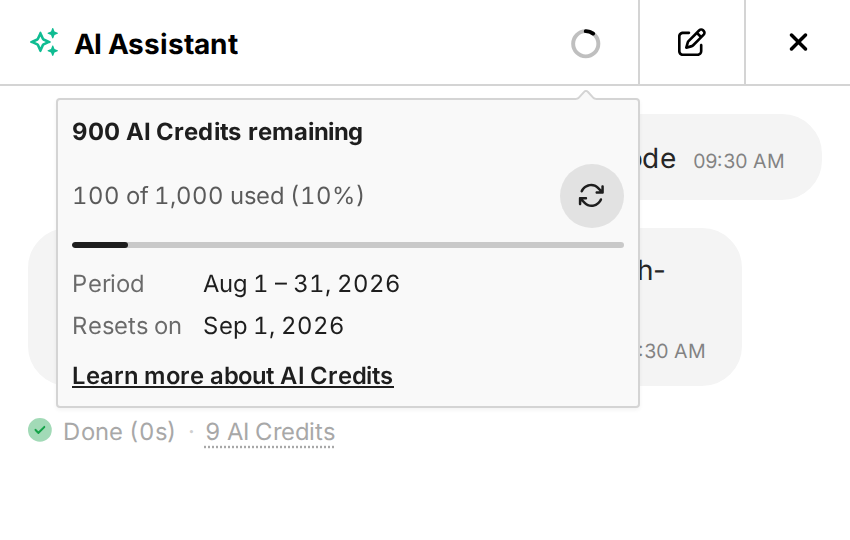
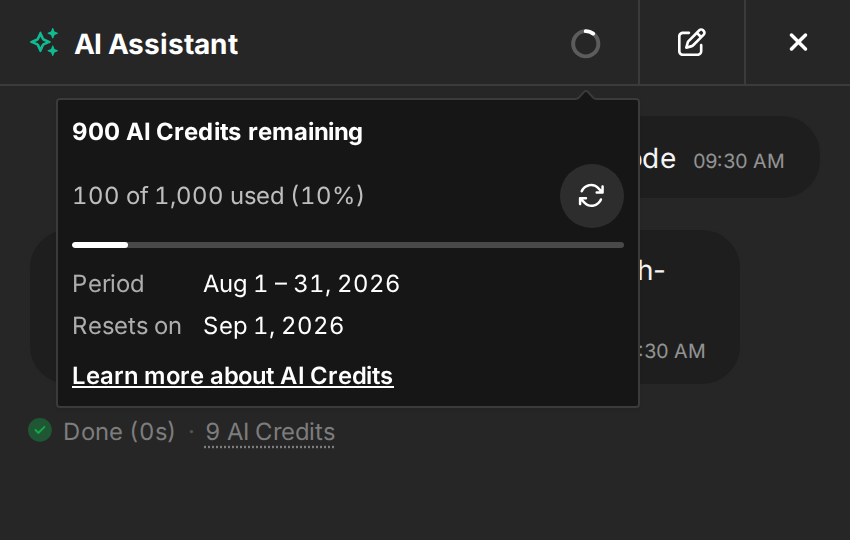
When the editor session has a complete, active, enforced balance, the Assistant header shows the credits used and remaining in the current monthly window. Annual subscriptions still use monthly credit windows. Use the refresh action in the balance popover to include activity from other sessions and AI features. Because this indicator follows enforcement, it remains hidden for shadow-mode workspaces even when Console shows a positive allowance.
The balance is optional. White-label embeds without an active usage period, period dates, or complete balance data do not show an empty placeholder.
Choose where the credit link goes
For an embedded editor, set features.ai.creditsUrl to your own billing, usage,
or help page. It must be an absolute HTTP or HTTPS URL:
unlayer.init({
  features: {
    ai: {
      creditsUrl: 'https://app.example.com/settings/ai-credits',
    },
  },
});
This changes the destination of workspace credit links, not metering or enforcement. In Console, a workspace Billing URL takes priority when one is available.
For a separate host-managed per-user allowance, use credits.ai.purchaseUrl
or the credits:purchase callback instead. See
In-Builder Credit Upsell.
When credits reach zero
This section applies only when enforcement is enabled. Shadow-mode workspaces are never paused by metered credit usage, even if Console displays a positive allowance.
The default behavior is show_error: AI controls remain visible, but the
editor stops new generations and explains that the workspace is out of credits.
You can instead hide AI controls in embedded editors by setting the project's
exhaustion_behavior to disable:
PUT /v3/projects/:id/ai-credits/settings
Authorization: Bearer unlayer_sk_...
Content-Type: application/json

{
  "exhaustion_behavior": "disable"
}
Use show_error to restore the default. Read the current value with
GET /v3/projects/:id/ai-credits/settings. See
AI Credits API and webhooks for
the full settings contract.
Recurring plan and credit-pack capacity resets at its next monthly boundary. One-time welcome credits do not refill. Eligible current plans with an active paid subscription can add capacity from Console → Billing → Add-ons; trial or legacy workspaces may need to change plans before self-service packs are available.
Customize the exhaustion message
Use the normal translation override mechanism. For an embedded end user who cannot manage workspace billing, customize the Assistant title, the feature-specific message, and the generic fallback:
unlayer.init({
  locale: 'en-US',
  translations: {
    'en-US': {
      'labels.ai.assistant.credits_exhausted.title':
        'AI credits are currently unavailable',
      'labels.usage_limit.errors.credits_exhausted_contact_owner':
        'Your {feature} credits are used up. Contact your account owner to continue.',
      'labels.usage_limit.errors.credits_exhausted_contact_owner_generic':
        'Your credits are used up. Contact your account owner to continue.',
    },
  },
});
Keep {feature} in the message if you want the editor to insert the localized
feature name, such as “AI generation.” The generic fallback is used when the
feature is missing or unrecognized; it does not receive a {feature} value.
These keys apply to workspace exhaustion. The separate host-managed per-user
notice uses labels.credits.*; see
credit notice translations.
Reset and expiration
Plan and recurring add-on credits are recurring allowances. Unused credits do
not accumulate when a new allowance window starts. The balance API returns
reset_date while it can resolve an active future billing window, and
null otherwise. Use the returned value instead of calculating it from the
subscription term.
A future reset_date is not a promise of renewal: when the subscription is
scheduled to end with that window, it marks expiration instead. See the
balance response.
Some eligible workspaces are offered a one-time 5,000-credit welcome bonus in Billing. It is not granted on first AI use; someone with billing access must select Claim now. The card shows the exact expiration date before the claim. The bonus normally expires at the next monthly credit reset, so it does not carry into a new window.
Billing offers the welcome bonus only when the workspace's current plan, subscription status, and AI feature eligibility qualify. Current Free and legacy plans do not qualify. Eligibility to buy a paid credit pack is separate. The bonus shares the workspace credit bucket and does not unlock excluded AI features.
Development and staging
There is no separate unmetered development tier. A dev or staging project uses the shared allowance of its workspace. To measure a workflow before launch, run it in a test project and inspect the request result or the usage API.
Grandfathered uncapped workspaces continue to meter that usage without pausing requests or creating overage charges.
If you resell AI, keep each end user's allowance and reset schedule in your own backend. The builder can display that state, but it does not replace backend enforcement. See In-Builder Credit Upsell.
Disable all AI features
unlayer.init({
  features: {
    ai: false,
  },
});